
eMule
0.50a
Size: 3.06 MB
Downloads: 116861
Platform: Windows (All Versions)

File sharing is getting more and more popular nowadays. That's because it's easier to look for a file in a very large file network than to search for it on torrent sites or Google. The world of file sharing is ruled by a couple of very popular programs. eMule is one of those programs. Initially named eDonkey, this program allows anyone to share his files on the Internet, in a very large network, offering anyone the possibility to download them in very little time. The program is very simple to install, being a Windows application. Using the program is also simple, as its interface has a graphical form.
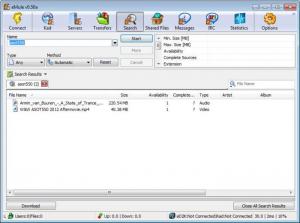
After installing and running the application, the user just needs to click on the Connect button included in the graphical toolbar. After doing this, the program will try to connect to the fastest server available. At this point, one can use the Search feature for finding a desired file. For producing more accurate results, one can select the type of file he would like to find, whether it's music, video or an image. After doing so, the program will quickly list all the available files, including the number of users who own that file, its size and type.
By double clicking on a found file, the user can easily download it. eMule supports multiple downloads at the same time and will save all of them in the default saving folder. For making it easier to manage a large number of downloaded files, they are grouped by status: completed, in progress and so on. Besides downloading files from other users, one can also share his own files and can also chat with the users where he downloads the files from.
eMule includes a fully featured IRC client, which is better than most dedicated IRC clients available on the market. There is also a statistics section available, which displays advanced and detailed information regarding the generated traffic, download and upload speed etc. This is useful for users who have an Internet connection with a limited traffic plan.
Pros
It allows connecting to a very large network and downloading almost any type of file. Besides that, more files can be downloaded at the same time. Furthermore, a fully featured IRC client is included in the program. What's more, the user can see various statistics regarding the generated traffic and upload and download speed.

Cons
Having so many features available, it's possible to lose track sometimes. eMule allows you to connect to a very large network and download any kind of file in the easiest and quickest way possible.

eMule
0.50a
Download
eMule Awards

eMule Editor’s Review Rating
eMule has been reviewed by Jerome Johnston on 09 May 2012. Based on the user interface, features and complexity, Findmysoft has rated eMule 5 out of 5 stars, naming it Essential







